

- Documentation
Users
The Users tab provides a dedicated area for managing WordPress users and their HMDIA registration, security and session information.
It contains two sections:
- All Users
- Temporary Login Access — Pro
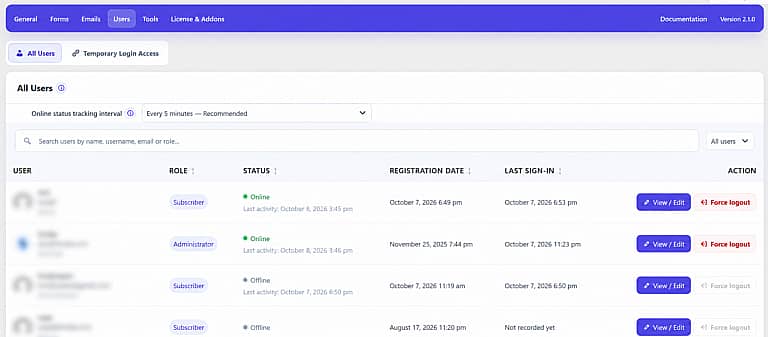
All Users
The All Users section displays each user’s name, email, username, role, status, registration date and last sign-in.
Click a column heading to sort users by role, status, registration date or last sign-in.
Online Status Tracking Interval
Choose how often HMDIA records activity for signed-in users.
Available intervals include:
- Never
- Every 1 minute
- Every 5 minutes — Recommended
- Every 10 minutes
- Every 15 minutes
- Every 30 minutes
Tracking is updated when a signed-in user loads pages. HMDIA does not continuously poll users in the background.
Shorter intervals provide more accurate presence information but create more database writes. Selecting Never disables Online and Offline tracking.
A user appears Online when they have an active WordPress session and recent activity. Otherwise, they appear Offline or Tracking off.
Search and Filter
Use the search field to find users by:
- Name
- Username
- Role
You can also filter the directory by:
- All users
- New users
- Active users
- Online users
- Pending approval
New users were registered within the last 30 days. Active users signed in or recorded activity within the last 30 days.
Registration Approval
When Require admin approval is enabled under General → Authentication, new accounts remain pending until reviewed.
Pending users display Approve and Reject actions.
A pending or rejected user cannot complete normal sign-in until the account is approved.
View / Edit
Click the user’s name or View / Edit to open the user details panel.
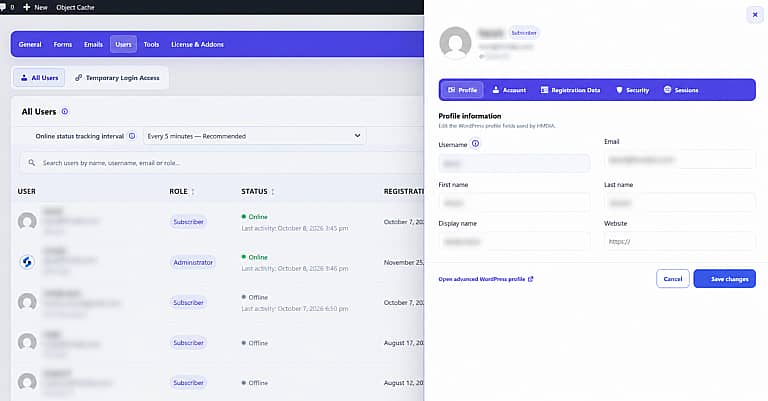
Profile
Edit the user’s:
- Email address
- First name
- Last name
- Display name
- Website
The WordPress username is shown but cannot be changed here.
Account
Review and manage the user’s role, registration approval, sign-in access, registration date, last sign-in and last activity.
Depending on your WordPress permissions, you can also:
- Change the user role
- Approve or reject registration
- Send a password reset email
- Delete the user
Registration Data
Shows a historical snapshot of the fields submitted when the account was registered.
Older accounts created before registration snapshots were introduced may not contain this information.
Security
Displays a safe summary of the user’s authentication security, including:
- Two-factor authentication
- Authenticator app
- Passkeys
- Recovery codes
- SMS verification
- Email 2FA
Passwords, authentication secrets and credential material are never displayed.
Sessions
Shows the user’s active WordPress sessions, including the browser or device, IP address, sign-in time and expiration time.
Online Status Tracking Interval
Click Force logout to end all active WordPress sessions for the selected user across every device.
The button is unavailable when the user has no active session.


