

- Documentation
Temporary Login Access
The Users → Temporary Login Access page lets you grant short-term, passwordless WordPress access without asking the recipient to register or create a password.
A temporary WordPress user is created only when the link is first used and is automatically removed when access expires or is revoked.
Temporary Login Access is a
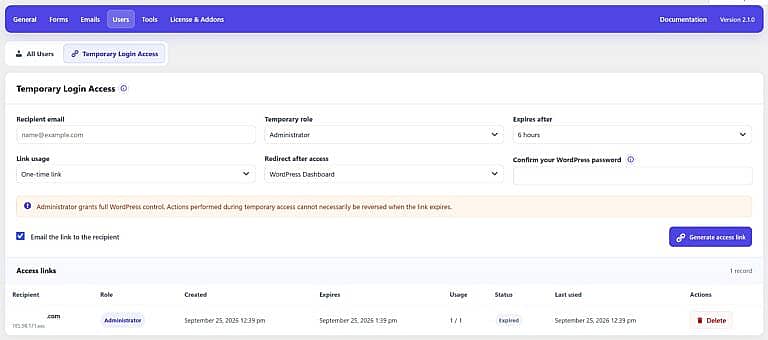
Recipient Email
Enter the email address of the person who should receive temporary access.
The address is also used when Email the link to the recipient is enabled.
Temporary Role
Choose the WordPress role assigned during temporary access.
The recipient receives the permissions associated with that role, so select the lowest level of access they need.
Administrator Access
Selecting Administrator gives the recipient full WordPress control.
HMDIA requires you to confirm your current WordPress password before generating an Administrator access link. Changes made by the temporary administrator may not be reversible when access expires.
Expires After
Choose how long the temporary access remains available.
Available durations include:
- 15 minutes
- 1 hour
- 6 hours
- 1 day
- 3 days
- 7 days
- Custom hours
Custom expiration can be set from 1 to 168 hours.
Link Usage
Choose how many times the access link can be used:
- One-time link
- Up to 5 uses
- Up to 10 uses
- Unlimited until expiration
The expiration time still applies even when unlimited usage is selected.
Redirect After Access
Choose where the recipient should be sent after successfully opening the link.
WordPress Dashboard
Sends the temporary user to the WordPress administration area.
Custom Internal URL
Sends the user to a specific page on the same website.
Email the Link
Enable Email the link to the recipient to send the generated link automatically.
The email content can be customized under:
Emails → Login & Registration → Temporary Access
Disable this option when you prefer to copy and share the link manually.
Generate Access Link
Click Generate access link after completing the required settings.
For security, the full link is shown only once. HMDIA stores only a secure hash of the token, so the original link cannot be recovered later.
Copy and store it securely before leaving the page.
Access Links
The Access links section shows previously created records, including:
- Recipient
- Assigned role
- Creation and expiration dates
- Usage count
- Current status
- Last-used date
- Masked IP address
Possible statuses include Active, Used, Expired, and Revoked.
Link Actions
Send Again
Creates and emails a new secure link for an active access record.
Revoke
Immediately disables the access and signs out its temporary user.
Delete
Removes the access record and any temporary user created by it.
Expired and revoked temporary users are also cleaned up automatically by HMDIA.


