The Forms → Contact form page lets you create a simple contact form directly inside HMDIA Login & Registration.
It is designed for basic contact or inquiry forms without needing a separate form plugin.
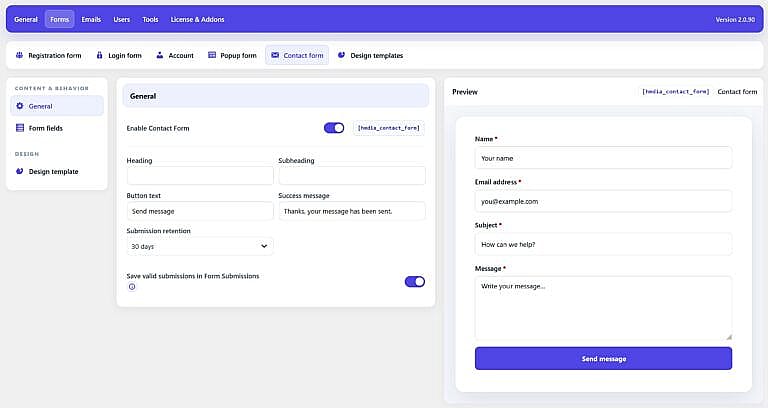
General
Enable Contact Form
Enable this option to activate the HMDIA Contact Form.
Once enabled, you can place it on any WordPress page using the Contact Form shortcode.
Heading
Set the main title displayed above the form.
Subheading
Add optional supporting text below the heading.
Button text
Change the text displayed on the submit button.
Default:
Send message
Success message
Set the message shown after a form is submitted successfully.
Default:
Thanks, your message has been sent.
Submission retention
Choose how long saved contact form submissions should be retained.
For example:
30 days
Older stored submissions are automatically removed according to the selected retention period.
Save valid submissions in Form Submissions
Enable this option to save successful contact form entries inside HMDIA.
This gives you a record of submitted messages in addition to any configured email notifications.
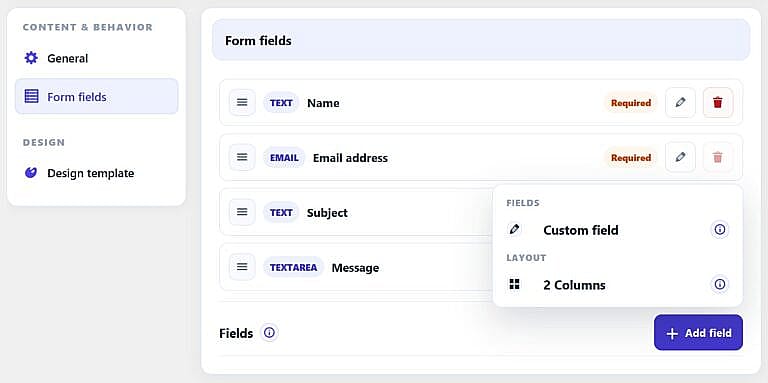
Form Fields
Use Form fields to configure the fields displayed on the Contact Form.
The default form can include fields such as:
- Name
- Email address
- Subject
- Message
You can control field labels, placeholders, required status and ordering.
The Contact Form is intended to remain a simple, lightweight form for standard website inquiries.
Design Template
Use Design template to assign a reusable HMDIA design to the Contact Form.
Templates are managed under:
Forms → Design templates