
The General → Captcha page controls anti-bot protection for HMDIA, WordPress and WooCommerce authentication forms.
HMDIA includes a built-in honeypot that works without API keys, plus optional integration with Cloudflare Turnstile or Google reCAPTCHA v3. You can then choose exactly which forms should receive spam protection.
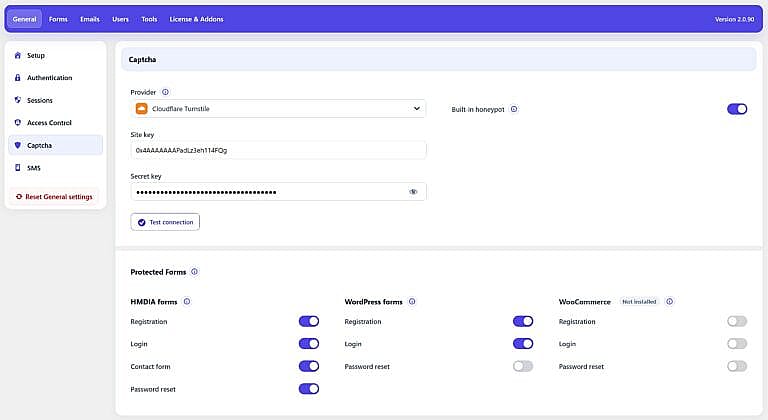
Use Provider to choose the external CAPTCHA service used to verify protected form submissions.
There are two options:
Uses Cloudflare Turnstile to verify form submissions.
When selected, enter your:
Site key
The public Turnstile key for your website.
Secret key
The private key used by HMDIA to validate Turnstile responses with Cloudflare.
After entering both keys, click Test connection to confirm that Turnstile is configured correctly for the current website.
Uses Google reCAPTCHA v3, which runs invisibly and assigns a score to each request instead of normally displaying a challenge.
When selected, enter the Site key and Secret key. An additional Minimum score setting appears.
The Minimum score determines how strict reCAPTCHA v3 verification should be.
The plugin accepts values from 0.1 to 0.9. The default is 0.5.
A higher value is stricter. If Google returns a score below your configured minimum, HMDIA rejects the request.
When you use Test connection, HMDIA also checks the returned reCAPTCHA score against this minimum.
Enable Built-in honeypot to add HMDIA’s lightweight invisible bot trap to protected forms.
Normal visitors do not see or interact with the honeypot field. Basic automated form-filling bots that incorrectly complete the hidden field are rejected.
The honeypot:
When both the honeypot and an external provider are enabled, the honeypot can reject simple bot submissions before external CAPTCHA verification is required.
After configuring Cloudflare Turnstile or Google reCAPTCHA v3, click Test connection.
HMDIA verifies that the selected provider can successfully validate a test from your website. The test checks the provider response, the verification action and the website hostname.
For Google reCAPTCHA v3, the test also checks whether the returned score meets your configured Minimum score.
A successful test confirms that the provider is connected and working for the current website.
If the test reports that the token belongs to a different hostname, make sure the current WordPress domain has been added to the website configuration in your CAPTCHA provider account.
The Protected Forms section determines where your configured spam protection is applied.
These switches are used by both the built-in honeypot and the configured external CAPTCHA provider.
For example, if Login is enabled under HMDIA forms and you have both Turnstile and the honeypot enabled, the HMDIA Login form receives both protections.
These settings protect forms generated directly by HMDIA Login & Registration.
| Form | What it protects |
|---|---|
| Registration | The HMDIA account registration form. |
| Login | The HMDIA login form. |
| Contact form | The HMDIA Contact Form when that feature is active. |
| Password reset | The HMDIA password-reset form. |
If the HMDIA Popup feature is enabled in the Forms tab, an additional Popup option appears here.
Popup and Contact Form controls are shown only when those corresponding HMDIA features are active.
When HMDIA is configured for passwordless authentication, the Password reset protection option is hidden because the normal password-reset flow is not required.
The WordPress forms section lets you protect WordPress’s native authentication screens independently from the HMDIA forms.
You can enable protection for:
Registration
Protects the native WordPress registration form.
Login
Protects the native WordPress login form, including wp-login.php.
Password reset
Protects WordPress’s native lost-password and password-reset flow.
These switches are useful when your website still allows users to interact with native WordPress authentication screens in addition to the HMDIA frontend forms.
As with HMDIA forms, the Password Reset option is not used when password authentication is disabled by the passwordless configuration.
When WooCommerce is installed, HMDIA can apply the same spam protection to WooCommerce’s native My Account authentication forms.
The available controls are:
Registration
Protects the native WooCommerce My Account registration form.
Login
Protects the native WooCommerce My Account login form.
Password reset
Protects the native WooCommerce My Account password-reset form.
These controls are independent from the HMDIA and WordPress form settings.
If WooCommerce is not installed, the section displays Not installed and its switches are disabled, as shown in your screenshot.