

Managing a website involves deployment, updates, security, backups and email. As a business grows, the same tasks may need to be repeated across several websites, applications and servers.
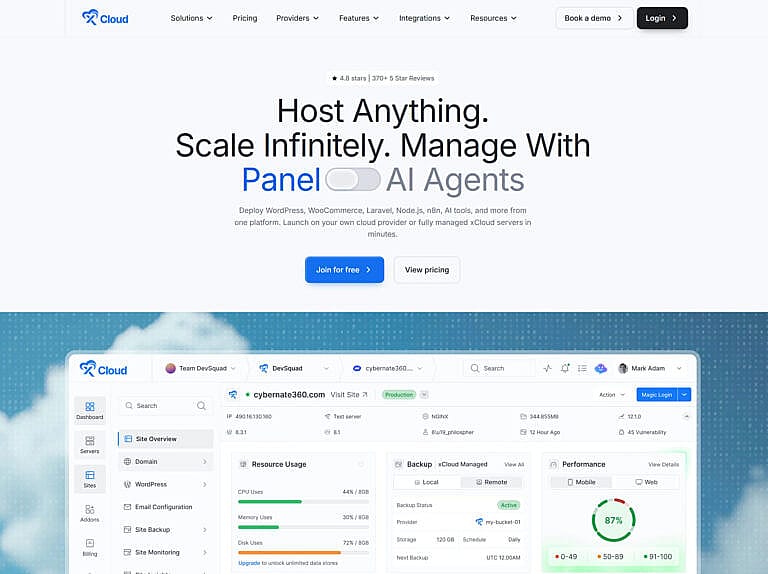
xCloud brings these responsibilities into a central control panel. Its platform supports WordPress, WooCommerce, Laravel, Node.js, static websites, PHP applications and Docker projects, with additional tools for agencies and hosting resellers. Its current feature overview also covers automation applications and AI workloads.
This guide explains what xCloud offers, how its hosting models differ, and which features carry additional costs.
What Is xCloud Hosting?
xCloud combines hosting services with a server management platform. You can purchase managed infrastructure through xCloud or connect a supported server from your own provider.
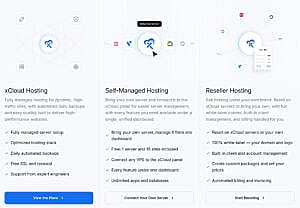
With managed hosting, xCloud provisions and manages the server. With self-managed hosting, you maintain your own infrastructure account and use xCloud’s panel to deploy and administer websites. Its reseller program adds branding, customer accounts and billing tools for businesses selling hosting.
The right choice depends on whether you want a managed server, already have infrastructure, or need to package hosting for clients.
WordPress and WooCommerce Hosting
WordPress remains a central part of xCloud’s offering. Users can create websites, manage WordPress core, plugins and themes, configure SSL, create staging environments and organize multiple installations through the dashboard.
Staging supports pushing and pulling changes between development and production. This gives businesses a place to check a redesign or plugin update before applying it to a customer-facing website. These capabilities are described on xCloud’s server management page.
For WooCommerce, hosting capacity should reflect how the store operates. A catalogue with occasional purchases has different needs from a store processing frequent orders or handling many simultaneous sessions. “Unlimited sites” describes the plan’s site allowance; practical capacity still depends on CPU, memory, storage and application demand.
Laravel, Node.js, Static Websites and Docker Applications
Laravel hosting
xCloud supports deploying Laravel projects from Git repositories and configuring their PHP version, database and application environment.
Its Laravel tools include queue workers for background jobs, the task scheduler for recurring work, and Horizon for monitoring Redis queues. Developers can also manage application cache, maintenance mode and debugging settings. These controls help support applications that need scheduled processing or background tasks alongside normal web requests. See xCloud’s Laravel hosting features.
Laravel applications also support staging and site cloning. Developers can create a separate copy for testing or deploy a clone to another server, with controls for its domain, database connection, environment and deployment script. This provides a practical way to test changes before updating production. See the Laravel cloning guide.
Node.js hosting
Node.js deployment includes selectable runtime versions, environment variables, deployment scripts and build settings.
xCloud’s deployment workflow distinguishes between static builds, server-side rendering through a Node process, and hybrid applications combining static content with an API. Developers can configure the application’s web root and enable deployment on repository pushes where supported. The Node.js deployment guide explains these options.
Static website hosting
Static websites can be deployed through xCloud’s Git workflow. This suits projects that publish generated HTML, CSS and JavaScript, including documentation, portfolios and marketing websites.
The deployment configuration should match the project’s build process and output directory. A static build does not need the same serving configuration as an application running a persistent Node process. xCloud documents these choices in its Git deployment workflow.
Docker and Docker Compose
Docker support extends xCloud to applications distributed as containers. Users can deploy custom Docker projects, supply a Docker Compose configuration, or connect a repository containing the relevant deployment files.
Docker Compose is useful when a project brings together several services, such as an application, a database and a cache. xCloud’s documented workflow requires a compatible Docker server configuration and supports both its managed infrastructure and users’ own servers. See the Docker deployment documentation.
Managed AI Hosting for OpenClaw, Hermes Agent and DeepSeek
xCloud offers managed AI-agent hosting with one-click deployment options for OpenClaw, Hermes Agent and DeepSeek Harness. These services provide infrastructure for running AI agents and their connected workflows beyond a local computer.
The managed offering includes firewall protection, SSL, automatic backups, monitoring and managed security updates. xCloud handles the hosting environment while users configure their agent, model provider, integrations and tasks. For example, its Hermes hosting page describes managed firewall rules, encrypted tokens and security updates alongside dashboard logs and monitoring.
This can suit businesses running ongoing automations or developers deploying AI projects that need an available server. The AI-agent hosting services are available offerings; the separately announced xCloud AI Assistant has its own release status, described later in this article.
One-Click Apps, n8n and Self-Hosted Business Tools
xCloud’s One Click Apps catalogue lists 308 applications at the time of this update. The selection covers automation, business software, developer tools and AI applications, with new options added as the platform develops.
Examples include:
| Application | Typical use |
|---|---|
| n8n | Workflow automation and AI integrations |
| Supabase | Backend services and databases |
| Nextcloud | File storage and collaboration |
| Mautic | Marketing automation |
| Ollama | Running AI models |
| Open WebUI | A web interface for AI models |
| Uptime Kuma | Uptime monitoring |
| LibreChat | AI chat with multiple model providers |
| WireGuard | Private VPN connections |
For example, n8n can connect business applications and APIs into automated workflows, while Nextcloud provides a platform for managing files and collaboration. One-click deployment reduces initial installation work; each application still needs appropriate configuration and sufficient server resources.
Current xCloud Pricing
xCloud’s main pricing categories are managed hosting, self-managed server management and reseller hosting. Optional services such as enhanced security, Cloudflare Enterprise and email have separate charges.
Managed hosting pricing
Managed hosting starts at $5 per month. Examples currently displayed on the pricing page include:
| Managed option | Monthly price | Memory |
|---|---|---|
| Entry-level Standard hosting | $5 | 1 GB |
| Growing Premium | $30 | 4 GB |
| Elite Premium | $50 | 8 GB |
| Titanium Premium | $100 | 16 GB |
Paid servers include unlimited site allowances. Standard and Premium configurations differ in their hardware and storage. Consult the current xCloud pricing page for the complete selection and billing terms.
Self-managed pricing
For users connecting their own infrastructure, the published panel rates are:
| Connected servers | xCloud panel price |
|---|---|
| One server, up to 10 sites | Free tier |
| 2–5 servers | $5 per server/month |
| 6–10 servers | $4 per server/month |
| 11 or more servers | $3 per server/month |
Paid servers allow unlimited sites. The underlying VPS or dedicated server is billed separately by your infrastructure provider. See xCloud’s self-managed pricing.
Reseller pricing
The reseller program currently advertises the following discounted monthly subscriptions:
| Plan | Monthly subscription | Server allowance | Additional platform fee for own-provider sales |
|---|---|---|---|
| Startup | $25 | Up to 25 | 25% or $3 per sale |
| Advanced | $50 | Up to 60 | 20% or $3 per sale |
| Corporate | $100 | Up to 150 | 15% or $3 per sale |
| Visionary | $250 | Up to 400 | 10% or $3 per sale |
The own-provider platform fee is separate from the subscription. The xCloud managed-server route uses a different fee structure without that own-provider sales surcharge. Server costs still need to be included when calculating your hosting margins. Review the reseller pricing and terms before choosing a plan.
Full Backups, Incremental Backups and Server Recovery
xCloud offers several backup options, so it helps to distinguish what each one protects.
Full site backups capture the selected website files and database. Users can choose files, database or both, configure exclusions, schedule automatic backups and set retention periods. Backups can be stored locally or through supported remote storage integrations. The site backup guide explains the available controls.
Incremental backups record changes since the previous backup. They can reduce repeated data transfers and storage requirements, which becomes useful as a website’s files and content grow. xCloud supports creating and restoring incremental backups through its dashboard. See its incremental backup documentation.
Remote storage integrations include services such as Cloudflare R2 and Google Drive, alongside supported object storage providers. Compatibility and storage charges depend on the selected integration; backup storage should be included in the overall hosting budget.
Full server backups protect the server environment as a whole. xCloud documents these as an optional managed-server add-on with an additional 20% cost. Provider-level backup availability and billing can differ when using external infrastructure. Check the server backup documentation for the relevant provider.
Keeping a remote copy provides a recovery option if the original server becomes unavailable. Backup frequency should also reflect how much recent work or transaction data the business can afford to lose.
Git Deployment, Staging, Snapshots, Blueprints and Migrations
Git deployment
xCloud supports public and private repository workflows, including projects hosted on GitHub, GitLab and Bitbucket. Developers can choose branches, configure deployment scripts, supply environment variables and use supported automatic deployment triggers.
The workflow also includes repository access through connected providers or SSH keys. This can make recurring releases more consistent, with the application’s deployment settings managed alongside its hosting configuration. See the Git deployment guide.
Site snapshots
A site snapshot preserves an existing WordPress site’s setup so it can be reused when creating another site. This is useful for preparing demonstration websites or repeating an established configuration across several projects.
xCloud provides controls for creating, organizing and deploying from these saved configurations. Its site snapshot guide explains the process.
Custom blueprints
Blueprints provide a repeatable starting configuration for new WordPress websites. An agency can prepare its preferred plugins and theme, add custom items through supported download URLs or ZIP uploads, and include a post-deployment command script.
This reduces repeated setup work and helps new projects begin with a consistent foundation. Custom ZIP uploads require compatible storage, as explained in the blueprint documentation.
Website and server migrations
xCloud provides migration workflows for existing websites, cPanel imports and bulk WordPress moves. Its full server migration tool can transfer multiple WordPress websites from a compatible source server to an xCloud-provisioned destination.
Requirements vary by migration method, including the source operating system, web server and access permissions. Check the full server migration requirements before planning a move.
After migration, verify the destination’s pages, forms, logins, checkout, scheduled tasks and email delivery before completing the DNS transition.
Security and Cloudflare Features
Server and website protection
xCloud’s security controls include:
- Separate system users for site isolation.
- A server firewall and configurable network access.
- Fail2Ban protection against SSH brute-force attempts.
- Secure SSH and SFTP access.
- WordPress vulnerability scanning.
- Additional controls for security headers and website access.
Site isolation helps limit access between websites sharing a server. The dashboard also provides controls for maintaining software and reviewing vulnerabilities. xCloud explains these measures in its server and website security documentation.
Its broader feature set includes SSL certificate management, 7G and 8G firewall rules, IP restrictions and AI crawler blocking, with availability depending on the server stack and configuration.
Site Security PRO
Site Security PRO is an optional WordPress security add-on powered by Patchstack. It provides virtual patching, early vulnerability detection and brute-force protection.
The currently advertised promotional price is $2 per site per month. Virtual patching adds protection while an affected component awaits an update; maintaining current plugins, themes and WordPress remains part of site administration. See Site Security PRO for current terms.
Cloudflare integration and Enterprise CDN
xCloud supports Cloudflare DNS management and controls for features such as WAF rules and Under Attack mode. These sit alongside the optional Cloudflare Enterprise service.
The Cloudflare Enterprise add-on costs $5 per domain per month, including 100 GB of monthly bandwidth, with additional usage listed at $0.02 per GB.
Its advertised capabilities include full-page edge caching, static asset delivery, tiered caching, a managed web application firewall, DDoS mitigation, image optimization, cache purging and dashboard analytics.
The add-on uses a CNAME-based setup, allowing users to retain their existing DNS provider and nameservers. It is managed through xCloud, and its available controls follow that integration’s feature set. Review the Cloudflare Enterprise details for hostname coverage, limits and activation terms.
xCloud Mailbox and Transactional Email Delivery
Business email with xCloud Mailbox
xCloud Mailbox provides inboxes using your business domain, such as [email protected]. Features include aliases, forwarding, automatic replies, mailbox migration and support for email clients using IMAP, POP3 or SMTP.
Published mailbox prices include:
| Mailbox storage | Monthly price |
|---|---|
| 100 MB | Free for eligible managed-hosting domains |
| 8 GB | $1 |
| 25 GB | $2.50 |
| 50 GB | $5 |
| 80 GB | $8 |
The free offer provides one eligible mailbox per domain, subject to account limits. xCloud’s FAQ excludes self-managed servers from the free offer and currently states that the Mailbox add-on is unavailable through its reseller program. Features vary by mailbox plan. See xCloud Mailbox for eligibility and plan details.
Website emails with xCloud Mail Delivery
Transactional email includes password resets, order confirmations, invoices and form notifications.
xCloud Mail Delivery provides managed SMTP sending powered by Elastic Email, with domain authentication and delivery tracking. The published free allowance is 100 emails per month per team, and the advertised 3,000-email plan costs $3 per month. See xCloud Mail Delivery.
Users can also connect external sending services such as Mailgun, SendGrid, Elastic Email or another SMTP provider. xCloud documents a WordPress integration workflow using FluentSMTP and the provider’s connection credentials in its SMTP setup guide.
A business may need both services: mailboxes for staff correspondence and transactional sending for automated website messages.
Team Management, API Access and Reseller Tools
Teams can assign access according to responsibilities. xCloud documents Site Admin, Server Admin, Team Admin and Owner roles, with configurable permissions and server access. This allows developers and support staff to work through their own accounts. See the team permissions guide.
For automation, xCloud offers a public REST API covering resources such as servers, sites, backups and deployments. API tokens control authenticated access. MCP integration also enables compatible AI tools to work with xCloud resources under the permissions granted to them. These capabilities appear in the platform feature overview.
xCloud explicitly supports connecting tools such as Claude/Claude Code, Cursor and Codex through MCP. Once connected and authorized, users can make natural-language requests involving their hosting resources, such as inspecting servers, deploying a site or managing WordPress installations. The available actions depend on the integration and granted access. xCloud also provides AI Agent Skills for supported workflows, as described in its agent integration overview.
Resellers can create branded hosting packages, use a custom domain, set prices, manage clients and generate invoices. Stripe Connect supports customer payments and recurring billing, while an integrated ticket system helps organize support requests. These tools are described in the reseller program.

xCloud AI Assistant: Upcoming Support for Server and Site Management
xCloud is also developing xCloud AI Assistant, which it describes as providing immediate help and proactive support for server and website operations. The intended benefit is to simplify ongoing administration and help users spend more time developing their websites and businesses.
As of September 17, 2026, the official xCloud website labels this feature “Upcoming.” Its availability should therefore be confirmed before choosing a hosting plan specifically for this capability. xCloud’s existing MCP and AI Agent Skills integrations are separate offerings for connecting compatible external AI tools.
Performance and Monitoring
xCloud supports page caching and Redis object caching. Page caching reduces repeated page generation, while object caching reduces repeated database work. Their suitability depends on the application and the content being served. The xCloud caching guide explains the available approaches.
Server controls also include PHP configuration, database management and resource monitoring. Managed servers can be resized as requirements grow. See the managed hosting overview for infrastructure options.
Hosting is one part of website performance. Themes, plugins, images and database behaviour also influence loading speed. Our guide to speeding up a WordPress website covers those additional factors.
Who Should Consider xCloud?
xCloud is relevant to businesses running WordPress websites, developers deploying Laravel or JavaScript applications, and agencies managing several client environments.
Managed hosting can suit organizations that want infrastructure and server administration through one provider. Self-managed plans suit users who already have servers and want a central control panel. Reseller plans support businesses that need branded hosting packages and customer billing.
Before choosing a plan, compare the complete cost: server resources, panel fees, backup storage, full server backups and any email, security or CDN add-ons. Then match the configuration to the applications and service responsibilities your business actually needs.
For help with the website running on that infrastructure, explore HMDIA’s web design and digital marketing services.