Your Google Business Profile is one of the most important tools for local SEO. When people search for a nearby service, store, restaurant, contractor, clinic, or digital marketing company, Google often shows local results before regular website listings.
For small businesses, this can make a big difference. A well-optimized Google Business Profile can help your business appear in Google Maps, attract more phone calls, increase website visits, and build trust before a customer even reaches your website.
But ranking higher is not about adding random keywords or trying to trick the system. Google explains that local results are mainly based on relevance, distance, and prominence. In simple words, Google wants to understand what your business does, where you serve customers, and how trusted your business appears online.
This guide explains how to optimize your Google Business Profile in a clean, professional, and long-term way.
Why Google Business Profile Matters for Local SEO
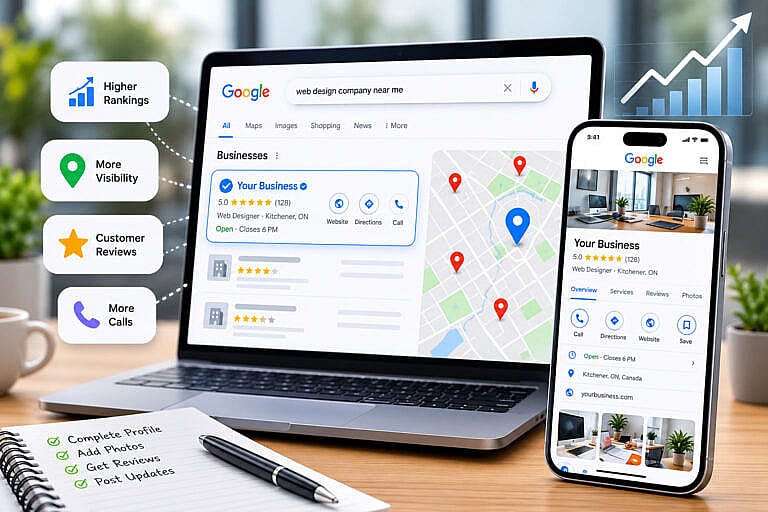
A Google Business Profile helps your business show important information directly on Google Search and Google Maps. Customers can see your business name, reviews, address or service area, phone number, website, hours, photos, products, services, and updates.
For many local searches, users do not visit several websites first. They compare businesses directly in Google Maps or the local pack. That means your profile needs to make a strong first impression.
Google’s official guide on improving local ranking explains that local visibility depends on relevance, distance, and prominence. Your profile should therefore clearly match what people are searching for, show accurate location or service-area information, and build trust through reviews, photos, links, and consistent business information.
1. Complete Every Important Profile Field
The first step is to complete your profile as much as possible. An incomplete profile can make your business look less active and less trustworthy.
Make sure these important fields are accurate:
- Business name, category, phone number, website, and hours
- Address or service areas, depending on your business type
- Services, products, business description, photos, and opening date
- Holiday hours, appointment links, and messaging options if available
Your business name should match your real-world business name. Avoid adding extra keywords unless they are part of your actual name. For example, “HMDIA” is better than “HMDIA Best SEO Web Design Google Ads Company Toronto” because keyword stuffing can look unprofessional and may create problems with Google’s guidelines.
Your description should be clear and helpful. Explain what your business does, who you help, and where you provide services. For example, HMDIA provides web design, SEO, Google Ads, and digital marketing services for small businesses that want stronger online visibility and better leads.
2. Choose the Right Business Categories
Your primary category is one of the most important parts of your Google Business Profile. It helps Google understand what your business is mainly about.
Choose the category that best describes your core service. If you are a web design company, your main category should be closely related to web design. If you are a dentist, contractor, restaurant, accountant, or beauty salon, choose the most accurate category for that business type.
Secondary categories can be added when they are truly relevant, but they should not be used randomly. Adding unrelated categories may confuse Google and potential customers.
After choosing your categories, review your services. Add the services that your business actually provides and write short descriptions where possible. This helps customers understand your offers and gives Google more context about your business.
3. Add Services, Products, and Photos
Your profile should not be empty after the basic setup. Google allows many businesses to add services, products, photos, and videos. According to Google’s Business Profile help, photos and videos can help complete your profile and make it more attractive to customers. Google also notes that exterior photos can help customers recognize your business when they visit.
For service businesses, your services section should be clear and specific. Instead of only writing “marketing,” use service names that customers understand, such as SEO services, Google Ads management, WordPress web design, local SEO, or website maintenance.
Photos should also be real and professional. Use images of your team, workspace, completed projects, storefront, products, service process, or before-and-after examples when appropriate. Avoid using only generic stock images because they do not build the same trust as real business visuals.
4. Get More Real Customer Reviews
Reviews are one of the strongest trust signals on your Google Business Profile. A business with recent, honest, and detailed reviews often looks more reliable than a business with no reviews or old reviews.
Google allows verified businesses to reply to reviews, and reviews can help potential customers understand the quality of your service. You can learn more from Google’s guide on managing customer reviews.
A good review strategy includes:
- Asking happy customers for honest reviews after a completed service
- Sending a direct review link to make the process easier
- Replying professionally to both positive and negative reviews
Do not buy fake reviews or ask people to leave misleading feedback. Fake reviews can damage your reputation and may violate platform policies. Real reviews are better for customers, Google, and long-term local SEO.
5. Respond to Reviews Like a Professional
Responding to reviews shows that your business is active and cares about customer experience. A simple thank-you message can make your profile feel more trustworthy.
For positive reviews, thank the customer and mention the service naturally if it makes sense. For example: “Thank you for your feedback. We’re glad you were happy with your website design project and appreciate you choosing HMDIA.”
For negative reviews, stay calm and professional. Do not argue publicly. A helpful response can show future customers that your business takes feedback seriously. If needed, invite the customer to contact you directly so the issue can be reviewed privately.
6. Keep Your Website and Profile Connected
Your Google Business Profile should connect to a strong website. Google Maps visibility can help you get attention, but your website often helps turn that attention into real leads.
Make sure your website has clear service pages, location information, contact details, and helpful content. If your profile says you offer SEO services, your website should have a page or section explaining those SEO services. If your profile says you serve Kitchener, Waterloo, Toronto, or Richmond Hill, your website should make your service areas clear.
For better results, connect your profile to a page that matches the customer’s intent. In many cases, linking to your homepage is fine. But if you are running a specific campaign or focusing on one service, a strong landing page may perform better.
If your website needs a stronger local SEO foundation, HMDIA can help with web design, SEO, and digital marketing services.
7. Keep Your Business Information Consistent Online
Your Google Business Profile should match your information across the web. This includes your website, social media pages, directory listings, and local citation websites.
Consistency is important because customers and search engines should see the same business name, address, phone number, website, and service information everywhere. If one website shows an old phone number and another shows a new one, it can create confusion.
You can also create a free listing in the HMDIA Business Directory to build another trusted online presence for your business. Business directories can support local visibility when they are accurate, relevant, and maintained properly.
8. Publish Updates and Keep the Profile Active
An active profile looks more trustworthy than a profile that has not been touched in months. Google Business Profile allows many businesses to share updates, offers, events, and announcements.
You do not need to post every day. The goal is to keep your profile fresh and useful. You can share company news, seasonal offers, service updates, new projects, helpful tips, or important changes to hours.
For example, a digital marketing agency could post about a new web design service, a local SEO tip, or a reminder to prepare Google Ads campaigns before a busy season. A restaurant could share menu updates, holiday hours, or special promotions.
9. Optimize for Local Keywords Naturally
Local keywords can help customers and search engines understand your business. However, they should be used naturally.
Your profile, services, website, and content should mention what you do and where you serve customers. For example, a business might mention “SEO services in Kitchener-Waterloo,” “WordPress web design for small businesses,” or “Google Ads management in Ontario” when those phrases accurately describe the service.
Avoid repeating keywords too many times. A profile that sounds natural and helpful is better than one that sounds forced. The goal is clarity, not keyword stuffing.
10. Track Your Performance and Improve Over Time
Google Business Profile optimization is not a one-time task. After updating your profile, monitor performance and continue improving.
Review your calls, website clicks, direction requests, profile views, customer messages, and reviews. Also check Google Search Console and Google Analytics to understand how people find your website after they visit from Google.
Important metrics to watch include:
- Calls, website clicks, direction requests, and messages
- Search terms, review growth, and photo engagement
- Website leads, form submissions, and service-page traffic
Tracking helps you understand what is working. If your profile gets views but few calls, your offer, reviews, photos, or landing page may need improvement. If your website gets traffic but no leads, your page layout, content, or call to action may need to be stronger.
Google Business Profile and AI Search in 2026
In 2026, local SEO is not only about traditional Google rankings. People are using Google AI Overviews, AI Mode, ChatGPT, Gemini, Perplexity, and other tools to compare businesses and ask for recommendations.
Google’s guide to optimizing for generative AI features in Search explains that SEO fundamentals still apply to AI-powered Search experiences. That means your business should have clear information, helpful content, crawlable website pages, structured data, reviews, and trusted mentions across the web.
A strong Google Business Profile supports this because it gives search systems clear information about your business. But your profile should work together with your website, directory listings, reviews, and local content.
Final Thoughts
Optimizing your Google Business Profile can help your small business rank higher, attract nearby customers, and build trust before people contact you. The most important steps are accuracy, completeness, real reviews, strong photos, clear services, consistent information, and a helpful website.
The best local SEO strategy connects everything together. Your Google Business Profile, website, reviews, directories, and content should all tell the same clear story about who you are, what you offer, and where you serve customers.
At HMDIA, we help small businesses improve their online visibility through professional web design, SEO, Google Ads, and digital marketing strategies.
Explore our web design, SEO, and digital marketing services or create a free listing in the HMDIA Business Directory to strengthen your local online presence.